"There's only 4 products there and i don't know how to edit the info below them or how to edit the drop down menu for what formats they are available in"
Sarah was learning TinaCMS, the editing system behind her new studio website. That WhatsApp message contained at least three different problems: why there were only four things in Products, where the information shown below each product came from, and how the choice of card, print or original was meant to work.
A generic help page would have told her to open Products and click a field. It couldn't have known which screen she was looking at, which of the two orange plus buttons she meant, or which fields she should leave alone.
The context stack
This happened inside one thread in the ChatGPT desktop app. I still instinctively think of it as the Codex desktop app for Mac. The current interface makes the useful unit much larger than a chat:
- The thread contained an app screenshot of WhatsApp, including Sarah's exact question and the unsent reply in the composer.
- The agent was attached to the Sarah's Studio repository. Its
AGENTS.mdidentified the active Next.js app, the TinaCMS schema, the owner guide, the production path and the boundaries between Sarah's work and mine. - The repository said that Sarah could own customer-facing words and pictures, while Product ID, Artwork grouping ID, Stripe Price ID, inventory policy and finite stock remained technical responsibilities.
- Chrome already had the live TinaCMS Products collection open. The agent could inspect the actual interface Sarah had just used, not a mock-up or remembered version.
- The existing private guide contained the intended operating model, so the answer could be checked against the documentation already written for her.
The context engineering came from specific sources with different authority: the human message explains the problem, the schema explains the software, repository instructions explain the safety boundary, the live browser proves the current UI, and the guide explains the intended workflow.
What it worked out
The key sentence was already embedded in the Tina schema:
One row per sellable format. Formats from the same painting share an artwork grouping ID.
The schema showed that those four rows were configured sellable formats, rather than evidence of a failed import.
The Kind dropdown changes the format of one row: Card, Print or Original artwork. If one painting is available as both a card and a print, those are two rows joined by the same Artwork grouping ID.
There were also two visually similar plus buttons with completely different effects. The plus button on the Products list adds another sellable format. The plus button beside Images adds another photograph to the current product.
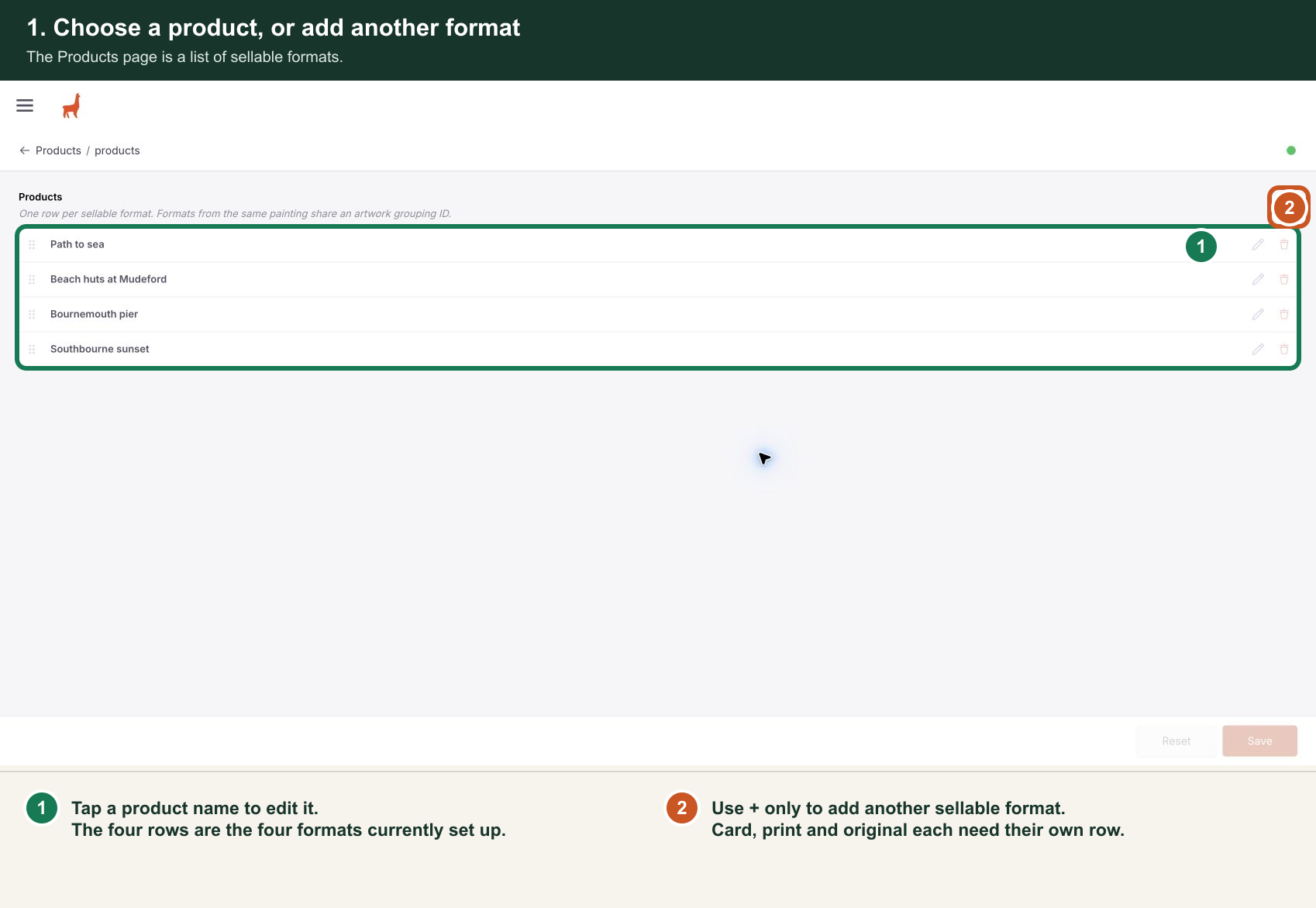
The agent opened one real product without changing it, captured the upper and lower parts of the form, and made four numbered screenshots. The annotations were deterministic overlays rather than a generated imitation of the UI, so the fields and buttons stayed pixel-accurate.
It then returned the browser to the unchanged Products list, verified the matching private-guide article, and wrote a short WhatsApp message I could send with the images.
Why the desktop interface matters
Each individual capability is familiar on its own: a model can read code, browser automation can click a page, screenshot tools can draw rectangles, and a chat can draft a message.
The difference is that they happened in one bounded environment, attached to the same thread and the same real task. The agent could move from Sarah's sentence, to the live CMS, to the source schema, to the owner guide, to the annotated help, without me translating state between five tools.
OpenAI's browser documentation describes the desktop browser as a shared view of websites and local web apps. This example felt more consequential than "browser automation." The shared view let the help material be made from the software Sarah was actually using, at the moment she was confused by it.
Now this post has been made in the same environment. The thread moved into the Oceanheart site repository, matched its existing Hugo blog format, reused the privacy-safe screenshot, and built and verified the article locally.
The recursive bit mattered because the evidence, the support material and the account of how it was made all remained attached to the event that produced them. That is what made the context detailed without making me repeat it.